
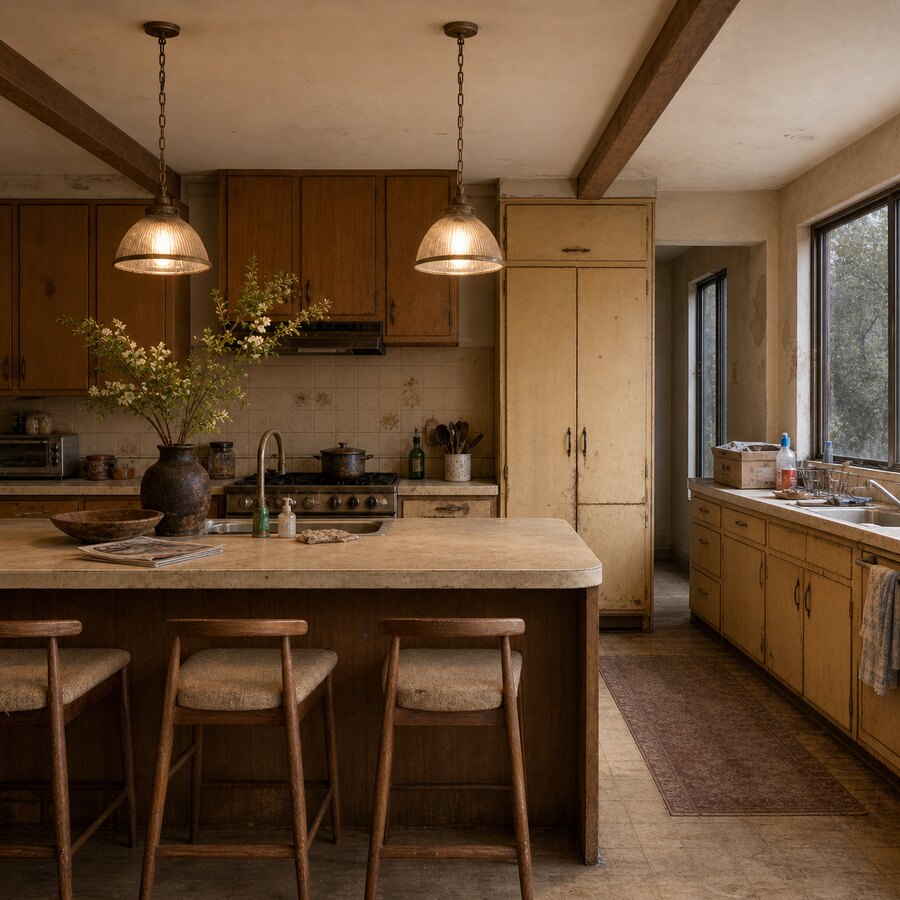
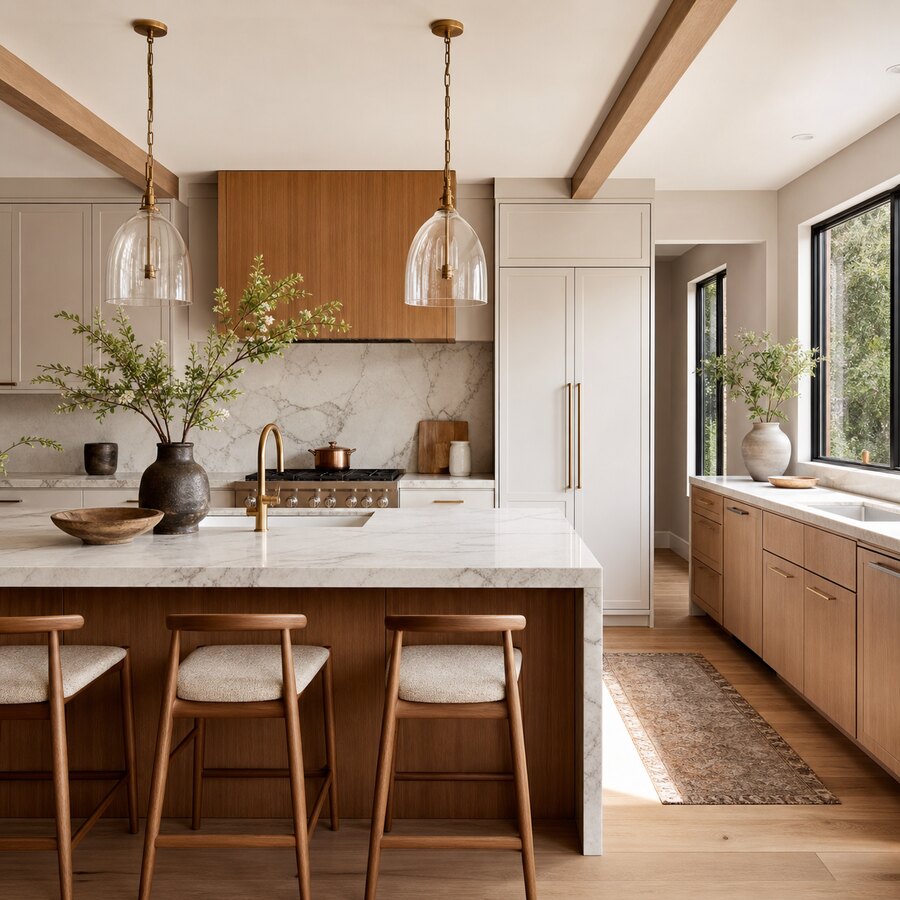
AI kitchen design lets you upload a photo of your current kitchen and preview different cabinet styles, colours, worktops, flooring, and layouts before you commit to a renovation. It is not a replacement for a measured survey or a qualified designer, but it is a practical way to reduce guesswork, compare ideas quickly, and arrive at your first contractor conversation with clearer preferences.
For UK homeowners planning a kitchen refresh, the biggest value is speed: you can test a shaker cabinet against a slab-front door, see whether dark green feels too heavy, or check if an open shelving idea works with the natural light you already have. Used well, an AI preview can help you spend your renovation budget with more confidence.
Key takeaways
- AI kitchen design is best used early, before you buy samples, book trades, or commit to a full design package.
- Photo upload previews reduce uncertainty by showing how cabinets, colours, finishes, and layout ideas could look in your actual room.
- The output is a visual concept, not a technical plan, so measurements, plumbing, electrics, ventilation, and structural work still need professional checks.
- Use several versions to compare realistic options: budget refresh, mid-range replacement, and bolder full-remodel ideas.
- A good prompt matters: include the room type, style, budget level, must-keep items, and any UK-specific constraints such as boiler boxing, radiators, or narrow galley layouts.
What is AI kitchen design?
AI kitchen design is the use of image-generation or room-visualisation software to create design previews from a photo of your existing kitchen. You upload a clear image, describe the look you want, and the tool generates a new version of the room with different cabinets, colours, lighting, flooring, worktops, or spatial ideas.
The strongest use case is visual decision-making. Instead of imagining how navy cabinets might look beside a pale quartz worktop, you can see a concept in the context of your own room. That context matters: the same cabinet colour can feel bright and elegant in a large extension, but cramped in a north-facing galley kitchen.
AI previews are especially useful when you are choosing between several renovation routes. You might compare a lower-cost repaint and handle upgrade with a full cabinet replacement, or test whether a peninsula would make the room feel more sociable. If you want to start experimenting, you can try the AI studio with your own kitchen photo and generate visual directions before speaking to suppliers.
Why photo upload previews reduce renovation guesswork
Kitchen renovations are expensive because many decisions are connected. Cabinet colour affects worktop choice. Worktop choice affects flooring. Flooring affects whether the room feels warm or clinical. Lighting changes everything again. AI kitchen design gives you a fast way to see those decisions together rather than judging each sample in isolation.
You can test finishes in your real light
Showroom lighting is rarely the same as home lighting. A beige door sample may look refined under retail spotlights and dull beside your existing tiles. By using a photo of your own kitchen, you get a more relevant first impression of how colour, contrast, and material balance might work in the actual space.
You can compare conservative and bold options
Many homeowners default to the safest option because they cannot picture the alternative. AI previews make it easier to test a bolder colour, a two-tone cabinet scheme, open shelves, or a different floor pattern without spending anything on materials. You can reject ideas quickly, which is useful in itself.
You can brief trades and designers more clearly
A builder, kitchen designer, or cabinet supplier still needs measurements and practical details. However, a set of AI concepts can make the first conversation more productive. Instead of saying “modern but still warm”, you can show a visual direction and explain what you like: flat doors, warm timber, softer lighting, less visual clutter, or more storage around the fridge.
What can you preview with AI kitchen design?
The best tools are useful because they can change more than one surface at a time. A kitchen is a layered room, so a convincing preview should help you understand the relationship between cabinets, walls, flooring, lighting, and layout.
Cabinet styles and door fronts
Cabinets set the tone of the kitchen. AI can help you compare shaker doors, handleless slab fronts, glass-fronted wall units, fluted details, or more traditional painted cabinetry. For period homes, it can also help you see whether a contemporary cabinet style clashes with the character of the room.
Colours and paint palettes
Colour decisions are where AI previews often feel most useful. You can test white, cream, sage, navy, charcoal, oak, walnut, or two-tone combinations. For UK kitchens with limited daylight, ask for “warm off-white”, “soft sage”, or “light oak accents” rather than very dark colours unless you are deliberately aiming for a dramatic look.
Worktops, splashbacks, and flooring
AI can suggest the visual effect of quartz, laminate, butcher block, terrazzo-style surfaces, marble-effect worktops, metro tiles, slab splashbacks, luxury vinyl tile, or engineered wood. Treat these as mood references, not exact product matches. If you love a preview, take it to a supplier and ask for real samples in similar tones.
Layout ideas
Layout previews can be helpful, but they need more caution. AI may show an island where there is not enough clearance, move a sink without considering plumbing, or remove a structural wall too casually. Use layout generations to explore possibilities, then validate them with measurements and professional advice.
How to get better results from a kitchen photo upload
A good input photo gives the tool more to work with. Stand back as far as possible, keep the camera level, and include the main cabinet run, floor, ceiling, window, and any appliances you want to keep. Natural daylight helps, but avoid taking the photo directly into a bright window if it turns the cabinets into silhouettes.
Then write a prompt with real constraints. For example: “AI kitchen design for a small UK galley kitchen, keep the existing window and cooker position, replace cabinets with warm white shaker doors, add light oak worktop, pale stone floor, brass handles, brighter under-cabinet lighting, practical family storage, not luxury.” This is more useful than “make my kitchen modern”.
If you are renovating on a tighter budget, say so. Ask for a cabinet repaint, new handles, better lighting, a new splashback, and decluttering rather than a complete rip-out. If you are planning a major renovation, ask for a full redesign but still list fixed items: boiler position, radiator, doors, windows, existing appliances, and whether walls can change.
How to use AI kitchen previews before spending money
Start broad, then narrow down. Generate three directions: a budget refresh, a practical mid-range renovation, and a more ambitious full redesign. Save the best version from each and compare them against what you can actually afford. In the UK, even modest kitchen work can run into thousands of pounds once fitting, electrics, plumbing, tiling, flooring, waste removal, and VAT are included.
Next, turn your favourite preview into a shopping and briefing list. Note the cabinet colour, door type, worktop tone, splashback style, flooring direction, lighting changes, and storage ideas. This list helps you request like-for-like quotes and avoid vague conversations where every supplier interprets the brief differently.
Finally, check the idea against your daily routine. Does the bin have a place? Is there landing space beside the hob? Can the dishwasher open without blocking the main walkway? Is the fridge still convenient? A beautiful AI render is only useful if the kitchen would work on a wet Tuesday evening when someone is cooking, someone else is unloading shopping, and the worktops are not perfectly clear.
What AI kitchen design cannot do
AI is a preview tool, not a building-control document. It cannot reliably check whether a wall is load-bearing, whether your consumer unit can support new circuits, whether extraction meets requirements, or whether plumbing routes are sensible. It may also invent cabinet sizes, appliance proportions, or storage solutions that do not match standard UK product ranges.
Use AI for visual confidence, not technical certainty. Before ordering, you still need accurate measurements, product specifications, samples, and professional advice where required. For broader planning, it can help to read practical renovation guidance such as how to renovate a small kitchen on a budget in the UK and compare visual examples across other room makeovers like small UK living room ideas.
When is AI kitchen design worth using?
AI kitchen design is worth using when you are at the ideas stage, choosing between styles, preparing a brief, or trying to decide whether a renovation is worth pursuing. It is also useful if two people in the household disagree: seeing several options can move the discussion from personal preference to visible trade-offs.
It is less useful if you already have a final measured design from a kitchen company and only need technical drawings. Even then, it can still help you sanity-check colour and finish choices before you pay deposits. For a soft next step, upload one clear photo and try the AI studio to create a few kitchen directions before you visit a showroom or request quotes.
FAQ
Can AI kitchen design replace a kitchen designer?
No. AI kitchen design is best used as a visual planning tool. A kitchen designer, fitter, or architect can check measurements, ergonomics, structural limits, services, and product specifications. Use AI to clarify the look you want before paying for detailed design work.
Do I need a professional photo?
No. A clear phone photo is usually enough. Take it in good light, keep the camera level, and include as much of the kitchen as possible. If the room is small, take two or three angles so you can test different views.
Can AI show a realistic cabinet colour?
It can show a useful impression, but it should not be treated as an exact colour match. Screen brightness, lighting, and image generation can all shift the tone. Always order physical samples before buying cabinets, worktops, paint, or flooring.
Is AI kitchen design useful for small UK kitchens?
Yes, especially for galley kitchens, flats, terraces, and compact family homes where every decision affects space. It can help you test lighter colours, slimmer storage, better lighting, and visual tricks before committing to a renovation plan.
Can AI redesign the layout of my kitchen?
It can suggest layout ideas, but those ideas must be checked. Clearance around islands, appliance door swings, plumbing, electrics, ventilation, and structural walls all need proper assessment before any work begins.